K-pop Lightstick Guide: History, Fandom Colors & Concert Technology
Complete guide to K-pop lightsticks: history from balloons to Bluetooth, official fandom colors and fan club names, concert syncing explained, how to buy authentic lightsticks, and care tips.
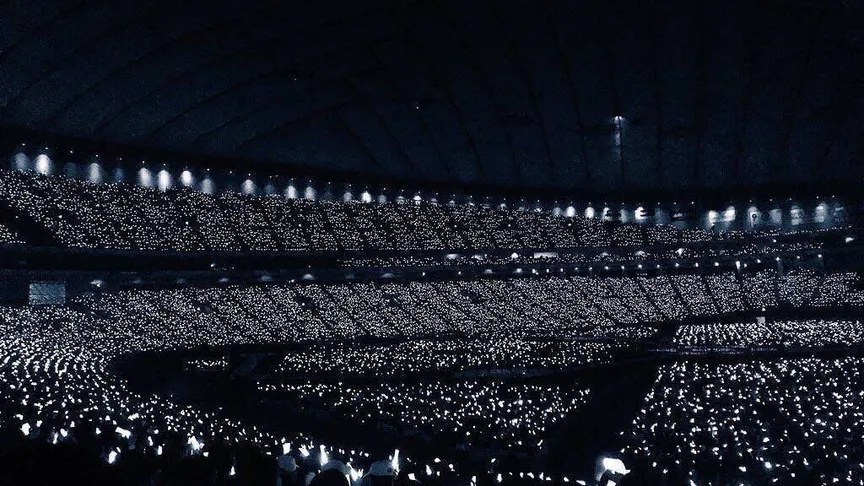
You have seen the photos: a stadium filled with thousands of synchronized glowing lights, each one a different shape and color. That is the lightstick ocean, and it is one of the most powerful symbols in K-pop.
But lightsticks are more than just pretty accessories. They are a window into K-pop fandom culture: how fans organize, how they identify themselves, and how technology has transformed the concert experience. We will cover all of it, from the colored balloons of the 90s to the Bluetooth-synced smart devices fans carry today.
What Is a K-pop Lightstick?
A K-pop lightstick is an official light-up merchandise item created by a K-pop group’s entertainment company. It is the symbol of the group’s fandom. Unlike generic glow sticks at Western concerts, each K-pop lightstick has a unique shape that reflects the group’s identity, often incorporating the group’s logo, fandom name, or signature motifs into the design.
Lightsticks serve several purposes:
- Fandom identity: carrying a lightstick signals which group you support
- Concert participation: fans use them during performances to create synchronized effects
- Collectible merchandise: each new version or tour edition becomes a collector’s item
Most lightsticks glow in the group’s official fandom color. When thousands of fans hold them up at a concert, the effect is a unified sea of color that artists often acknowledge from the stage.
A Brief History of K-pop Lightsticks
The Balloon Era (Late 1990s–2000s)
Before lightsticks existed, K-pop fans expressed their support using colored balloons. H.O.T. fans carried white balloons in the late 1990s, creating the first “balloon ocean” at concerts. Other first-generation groups followed: Sechskies used yellow, Fin.K.L used pink, and g.o.d used sky blue.
This era established the core idea of K-pop fandom: each group has a distinct color that unites their supporters.
Official Fan Clubs and Colors (2000s–Early 2010s)
As K-pop grew, entertainment companies formalized fan culture by creating official fan clubs with registered names and official colors. Second-generation groups set the standards still used today:
- TVXQ debuted in 2003 and became associated with the fandom name Cassiopeia and the official color Pearl Red
- Super Junior launched ELF (Ever Lasting Friends) with Pearl Sapphire Blue
- SHINee debuted with SHAWOL and Pearl Aqua (often seen as green)
During this period, fans used simple glow sticks or basic light-up wands with the group’s name printed on them. These were functional but not yet the elaborate, branded designs we see today.
The First Official Lightsticks
The modern K-pop lightstick was born when groups began releasing branded, uniquely shaped lightsticks.
Big Bang’s Bang Bong is widely credited with popularizing the modern concept of the uniquely branded K-pop lightstick. Reportedly designed by G-Dragon, the crown-shaped lightstick helped VIPs stand out in the crowd and set a new standard for fan merchandise.
In 2015, BTS introduced the first version of the ARMY Bomb, a translucent globe-shaped lightstick. Later that year, EXO released their first official lightstick, a black hexagonal design with the group’s EXO logo at the top.
From this point onward, official lightsticks gradually became a standard part of K-pop fandom culture.
Official Fandom Colors and Fan Club Names
Most established K-pop groups have an official fandom name, and many also have official fandom colors. The color is often established as an official convention by the entertainment company and is used not only for lightsticks but also for official merchandise, website themes, and promotional materials.
Here are the fandom names and colors for major groups, with status notes:
| Group | Fandom Name | Associated Color | Status |
|---|---|---|---|
| TVXQ | Cassiopeia | Pearl Red | Official |
| Super Junior | ELF | Pearl Sapphire Blue | Official |
| Girls’ Generation | SONE | Pastel Rose Pink | Official |
| SHINee | SHAWOL | Pearl Aqua | Official |
| EXO | EXO-L | - | No official color |
| BTS | ARMY | Purple (Borahae) | Symbolic† |
| BLACKPINK | BLINK | Black & Pink | Branding |
| TWICE | ONCE | Neon Magenta | Official |
| Red Velvet | REVELUV | Red & Coral | Branding |
| SEVENTEEN | CARAT | Rose Quartz & Serenity | Official |
| NCT | NCTzen | Pearlescent Green | Official |
| Stray Kids | STAY | - | No official color‡ |
| MAMAMOO | MOOMOO | White & Green | Unofficial§ |
† BTS does not have a registered official fandom color. Purple became the symbolic color of ARMY after V coined the phrase “I purple you” in 2016, meaning “I trust and love you.” The ARMY Bomb glows purple at concerts by convention.
‡ Stray Kids is frequently associated with red in their branding, but the group does not have an officially registered fandom color.
§ MAMAMOO’s white and green are widely used in official merchandise and promotions, but the group has never formally designated these as an official fandom color through a registration process.
Some groups have updated their colors over time, and newer groups sometimes use multi-color palettes rather than a single official color. This is especially common among fourth-generation and fifth-generation groups.
Notable Lightstick Designs
Lightsticks are designed to reflect each group’s identity through shape, color, and branding. Here are some of the most well-known designs and their visual characteristics.
Big Bang’s Bang Bong (Crown): Widely credited with popularizing the modern K-pop lightstick, the Bang Bong takes the shape of a jeweled crown. G-Dragon designed it so VIPs (Big Bang’s fandom) could feel like royalty in the crowd.
BTS ARMY Bomb (Globe): The ARMY Bomb has evolved through multiple versions, but its core shape remains a translucent globe. Early versions used a camouflage pattern; newer versions added Bluetooth, app control, and customizable colors.
EXO Lightstick (Hexagon): EXO’s lightstick features a black hexagonal head with the group’s logo, matching the sci-fi concepts of their early era. The design is often referred to by fans as Eribong, a combination of “EXO” and the Korean word for lightstick (bong). It glows in white.
BLACKPINK’s Hammer Lightstick: Shaped like a pink hammer with a black handle, the design stands out for its unconventional silhouette. It glows in pink and is often synchronized to shift between black and pink during concerts.
TWICE Candy Bong (Lollipop): TWICE’s lightstick takes the shape of a colorful lollipop, with bright neon colors that match the group’s visual identity. The Candy Bong has gone through several versions, each adding more features while keeping the candy theme.
SEVENTEEN Carat Bong (Diamond): The faceted diamond shape references SEVENTEEN’s fandom name CARAT (a unit of diamond weight). The connection between diamond and fandom name is widely noted by fans.
SHINee’s Diamond Lightstick: The diamond-shaped design is often associated with SHINee’s stage image and their fandom color Pearl Aqua. It glows in Pearl Aqua.
NCT’s Neobong: NCT’s lightstick, commonly called the Neobong, features a cube-shaped top with the NCT logo on a translucent surface. It is immediately recognizable by its bright neon green glow, matching NCT’s pearlescent green fandom color.
Stray Kids’ Compass Lightstick: The lightstick uses a compass-inspired shape with a sleek black and red design. The compass motif is often noted by fans as a reference to the group’s guiding role.
ATEEZ Lightiny: ATEEZ’s lightstick, called the Lightiny, features a transparent globe design with a compass and world map inside, matching the group’s pirate and explorer concept. The name “Lightiny” combines “light” and “ATINY” (the fandom name).
Newer groups continue to release increasingly creative lightstick designs, making them not just concert accessories but also collectible merchandise for fans.
How Lightstick Technology Works
Modern K-pop lightsticks are sophisticated electronic devices. Understanding how they work helps you get the most out of them at concerts.
Basic Components
Inside every lightstick is an LED light source, a battery compartment, and a circuit board. Basic lightsticks have simple on/off switches and maybe 2–3 color modes. More advanced models add Bluetooth modules, and some may include additional features like NFC tags depending on the manufacturer and version.
Bluetooth and App Control
During the late 2010s, Bluetooth-enabled lightsticks became increasingly common among major K-pop groups. These lightsticks connect to a smartphone app that lets you:
- Change colors manually
- Switch between concert mode and manual mode
- Update firmware for new features
- Register your seat location before a concert
Most groups use dedicated apps: Weverse for HYBE groups (BTS, TXT, ENHYPEN, LE SSERAFIM), Wyth for SEVENTEEN, SM Lightstick for SM Entertainment groups, and YG Lightstick for YG groups.
Concert Syncing (Central Control)
For many modern lightsticks from major groups, concerts can involve centralized wireless control. Before the show starts, you enter your seat information (gate, row, seat number) into the app. During the performance, a wireless control system at the venue sends signals to every paired lightstick based on its location.
This creates effects that would be impossible with manual control. Color waves sweep across sections, text messages appear in the crowd, and instant color changes sync with the music. The system is tested and programmed in advance, with lighting designers mapping sequences to each song in the setlist.
However, this technology is not universal. It typically applies only to Bluetooth-enabled lightsticks from major groups, and only when the venue and concert production support it. Older lightsticks, basic models, or lightsticks from smaller groups will not sync - they simply light up in a fixed color or manual mode. Some systems use radio frequency (RF) in addition to Bluetooth for more reliable coverage across large venues. Always check the group’s official app and concert guidelines to know what to expect.
What Happens If Your Lightstick Doesn’t Sync?
Several factors can prevent successful syncing:
- An outdated battery: weak batteries can interfere with Bluetooth connectivity
- Distance from signal transmitters: seats far from the stage may have weaker signals
- Structural interference: concrete pillars or walls can block wireless signals
- A counterfeit lightstick: fakes lack the proprietary chip required for central control
If syncing fails, the lightstick typically defaults to a single color or stays in manual mode. You can still enjoy the concert with a manually controlled lightstick, but you will miss the synchronized effects.
The Lightstick Ocean: The Concert Experience
Fans call it a lightstick ocean for a reason. When you stand in a stadium with 50,000 other fans, each holding a glowing lightstick in the same color, the effect is overwhelming. Artists regularly acknowledge the lightstick ocean from the stage, and it is one of the defining visual experiences of K-pop concerts.
Why It Matters
The lightstick ocean represents something deeper than a visual effect. It is a physical demonstration of collective fandom. Every person in that stadium made a deliberate choice to buy their lightstick, bring it to the venue, and participate in the synchronized experience. For the artist, seeing their official color filling the venue is a direct measure of their fandom’s reach.
Lightstick oceans also create strong social media moments. Concert-goers share videos of synchronized waves and color changes, which serve as organic promotion for the group and generate excitement among fans who could not attend.
Concert Etiquette
There are a few unwritten rules that experienced fans follow:
- Charge your batteries before the concert: fresh batteries ensure reliable Bluetooth performance
- Turn off your lightstick during talk segments: the focus should be on the artist, not the light display
- Keep it at chest height or higher: this helps create the full lightstick ocean effect
- Do not shake it aggressively: other fans around you paid for their view too
How to Buy an Authentic K-pop Lightstick
Counterfeit lightsticks are common, especially for popular groups like BTS, BLACKPINK, and TWICE. The safest way to make sure you get an authentic lightstick is to buy directly from official sources.
Official Sources
- Weverse Shop: official store for HYBE groups
- SM Global Shop: official store for SM Entertainment groups
- YG SELECT: official store for YG groups
- JYP Shop: official store for JYP groups
- Korea-based retailers like KTOWN4U and Cokodive. These are trusted third-party stores that source directly from Korean entertainment companies, but always check their reputation before buying.
- Official tour merchandise booths: artists sell merchandise at their concerts, and lightsticks are usually available. Buying at the venue guarantees authenticity, but stock is not guaranteed and popular items often sell out early.
How to Spot a Fake
- No Bluetooth pairing: if the lightstick cannot connect to the official app, it is fake
- Missing or low-quality authentication labels: many modern official lightsticks include holographic authenticity stickers, serial numbers, QR codes, or other verification features on the packaging. Missing or poorly printed labels can be a warning sign, but their absence alone does not prove a lightstick is counterfeit, since not all manufacturers include them.
- Suspiciously low price: compare prices across official stores and trusted retailers. If a listing is significantly cheaper than average, it is likely a fake.
- Poor build quality: fakes feel lighter and hollow compared to the solid weight of authentic lightsticks
- Short battery life: genuine lightsticks are optimized for 3–4 hours of use; fakes drain batteries quickly
If you are buying second-hand, the best way to verify authenticity is to test the lightstick in person. Ask the seller to connect it to the official app in front of you. If they can demonstrate it working, the lightstick is likely authentic. If meeting in person is not possible, ask for a video showing the connection process on the official app. A failed connection is a guaranteed sign of a counterfeit.
Lightstick Versions: Which One Should You Get?
Most major K-pop groups release multiple versions of their lightsticks over time. Some versions introduce genuine improvements like Bluetooth connectivity or better battery life, while others are mostly a design refresh with similar internal hardware.
- Version 1 (V1): The original release. Usually basic lighting with manual color modes. May lack Bluetooth. Collectible but often lacks modern features.
- Version 2 (V2): Added Bluetooth connectivity and app control. Standard for groups that debuted before 2017. Often has improved LED brightness.
- Version 3 (V3) and later: Further refinements, better Bluetooth range, NFC verification, and more durable materials. Some V3 models add wireless charging or improved battery compartments.
Keep in mind that not every new version is a major upgrade. Some releases change the design or packaging with minimal functional improvements, and older versions are sometimes deliberately left out of concert synchronization to encourage fans to buy the latest model. Always check the group’s official website or fan community to confirm which versions are still supported for syncing before buying.
If you are a collector, earlier versions can be valuable, especially limited tour editions. If you are attending a concert for the first time, buying the latest version ensures you get the full synchronized experience, but check first whether your older lightstick will still work.
Lightstick Care and Maintenance
A well-maintained lightstick can last through multiple concert tours. Here are some basic care tips:
- Use fresh batteries: most lightsticks use AAA batteries (2–3 depending on the model). Remove them during long-term storage to prevent corrosion.
- Store in a cool, dry place: heat and humidity can damage the LEDs and circuit board
- Update firmware before concerts: check the app for updates ahead of your show date
- Handle with care: the LED module is fragile. Dropping the lightstick can damage the internal components
- Keep the authentication sticker if the lightstick has one: it can serve as proof of authenticity for future resale or verification
Frequently Asked Questions
Can I use an older version of a lightstick at a current concert? Usually yes, but the main problem is synchronization. When artists release new versions, older versions often lose compatibility with the wireless control system used at concerts. Even if the older version has Bluetooth, it may not sync with the venue’s central control. Your lightstick will still light up, but it will not change colors or effects in sync with the rest of the crowd. Most companies support the previous version alongside the latest one for at least one tour cycle, but support eventually drops. Check the official notice before your concert.
Do I need a lightstick to enjoy a K-pop concert? Not at all. Many fans attend without one and still have an amazing experience. The lightstick just adds an extra layer of participation.
How much does a K-pop lightstick cost? Official lightsticks typically range from $35 to $60 USD, depending on the group and version. Special editions or tour versions can cost more.
Can I bring a lightstick from one group to another artist’s concert? If you can afford the artist’s official lightstick, go for it. It’s the best way to participate in the synchronized effects and show your support. But if you cannot afford it, bringing any lightstick is usually better than bringing nothing. Some artists or venues may prohibit lightsticks from other groups, but that is rare. Your best bet is to check what other attendees are planning to do: look at official fanbase announcements, venue instructions, and the artist’s own guidelines. In regions where official lightsticks are expensive or hard to get, mixed lightsticks are common and accepted. When in doubt, having something to light is better than having nothing, but always check first.
Why is my lightstick not connecting to Bluetooth? Try fresh batteries first. If that does not work, close and reopen the app, or restart your phone. If the problem persists, the lightstick may be counterfeit or have a hardware defect.
Can I bring my lightstick to music shows and fan meetings? Yes, but rules vary by venue and event type. Music show recordings often have restrictions, so check the specific event guidelines beforehand.
Can I bring my lightstick on a plane? Yes, you can bring a K-pop lightstick in carry-on luggage. Since lightsticks contain batteries, they should not be placed in checked baggage. Remove the batteries or ensure the device is turned off during the flight. Check your airline’s specific battery policy before traveling.
How long do lightstick batteries last? Authentic lightsticks are optimized for 3 to 4 hours of continuous use on fresh AAA batteries. Using Bluetooth syncing may drain batteries faster. Remove batteries during long-term storage to prevent corrosion.
Can I customize my K-pop lightstick? Yes, many fans personalize their lightsticks with decals, stickers, custom handles, or modified LED colors. However, modifications can void warranties and may damage the Bluetooth module or circuit board. If you plan to attend a concert, check whether modified lightsticks will still sync with the venue’s control system.
What should I do if my lightstick breaks? First, try fresh batteries. If the LED does not light up, the circuit board or LED module may be damaged. Contact the official store for warranty options. Most lightsticks are not user-repairable, but some fan communities share repair guides for common issues like loose battery connections.
Lightsticks and the Future of Concert Technology
K-pop lightsticks have evolved from simple glow sticks into sophisticated smart devices, and the trend continues. Recent innovations include NFC verification for fan club membership, seat mapping for personalized light effects, and integration with artist apps for exclusive digital content.
As concert technology advances, lightsticks are becoming a bridge between the physical and digital fan experience. They are no longer just accessories. They are interactive tools that let fans participate in the show in ways that were impossible a decade ago.
Keep Reading
Related Posts